
What's included
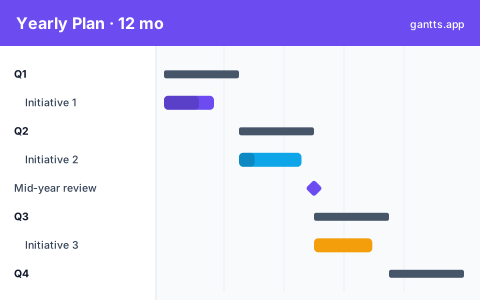
This 12 month gantt chart template is organized into four quarterly bands, each pre-filled with placeholder initiatives and milestones so you can adapt a full-year roadmap rather than start from a blank page:
- Q1 (Jan, Mar), kickoff initiatives, annual planning, and the first strategic projects of the year.
- Q2 (Apr, Jun), build and delivery work leading into the mid-year point. Milestone: mid-year review.
- Q3 (Jul, Sep), second-half initiatives, launches and campaigns.
- Q4 (Oct, Dec), closeout work, next-year planning and wrap-up. Milestone: year-end review.
12 months across 4 quarters
The strength of a yearly view is seeing the whole year at once. Each quarter is a band, and initiatives sit inside the quarter (or span several) so you can spot where too much lands in the same weeks. Two anchor milestones, the mid-year review at the end of Q2 and the year-end review at the end of Q4, give you natural checkpoints to reforecast. Because the timeline is monthly, this annual gantt chart template stays readable on one screen or one slide, which makes it ideal for board decks and leadership roadmaps.
Annual planning walkthrough
- Set the January start date (or your fiscal-year start) so the quarters align with your calendar.
- List your annual initiatives and drop each under the quarter it belongs to.
- Stretch initiatives that span quarters so multi-month programs read as a single bar.
- Add the milestones that matter, mid-year review, year-end review, budget deadlines.
- Assign an owner to each initiative so accountability is visible at a glance.
Who uses this template
Department heads, program managers, and small-business owners use a 12-month plan during annual planning and budget season. Splitting a full year into quarters, it maps major initiatives, campaigns, and milestones onto one timeline so leadership can spot clashes, balance workload across the calendar, and communicate the year's priorities at a glance.
How to customize it, edit online free
- Open the template in the free editor at app.html?csv=annual.
- Rename the initiatives under each quarter to your real projects and programs.
- Adjust durations so multi-month work spans the right months.
- Set milestones for your mid-year and year-end checkpoints.
- Export to PDF, PNG, Excel or PowerPoint for planning reviews and board decks.
Tips for annual planning
- Keep it to initiatives, not tasks. A yearly view works best at the program level; drop into a quarterly template or monthly template for task detail.
- Balance the load. If three big initiatives all land in Q2, spread them so teams aren't overloaded in the same months.
- Anchor to milestones. Use the mid-year and year-end reviews as reforecast points and adjust the second half based on how the first half went.
- Update monthly. Refresh % complete each month and re-export so leadership always sees the current roadmap.
Download formats
Grab the Excel (.xlsx), PowerPoint or CSV version above, or skip the download and edit online free. Browse every option in the templates library.
Related templates
- Quarterly Gantt chart template, zoom into a single 13-week quarter.
- Monthly Gantt chart template, plan a single month in more detail.
- Project management template, a generic phased plan for any project.
Frequently asked questions
What does the yearly Gantt chart template cover?
It gives you a full 12-month timeline split into four quarters (Q1, Q4), each with an initiative band, plus mid-year and year-end milestones you can adjust to your own annual plan.
Can I use a fiscal year instead of a calendar year?
Yes. Open the template in the free gantts.app editor and set the start date to the first day of your fiscal year, for example April or July, and all 12 months and quarters shift automatically.
How is this different from a quarterly template?
A quarterly template zooms into 13 weeks of one quarter, while this annual template shows all four quarters of the year at once so you can see the whole roadmap and how initiatives sequence across the year.
Is the yearly Gantt chart template free?
Yes. It is free to download and free to edit online with no sign up, and exporting to PDF, PNG, Excel and PowerPoint is free too.