
What's included
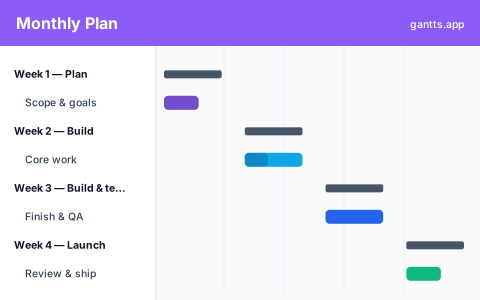
The template breaks the month into four weekly phases, each pre-filled with a representative focus so you can adapt rather than start from a blank page:
- Week 1, Plan, scope the work, agree goals and line up what each later week needs.
- Week 2, Build, the first block of delivery, carrying the plan into execution.
- Week 3, Build & test, finish the build while verification runs alongside it.
- Week 4, Launch, ship the work and close out. Milestone: month-end.
Who uses this template
Coordinators, marketing leads, and small-team managers running a project that fits inside a single month use this week-by-week view to keep a four-week push on track. It suits campaigns, event build-ups, or sprint-length initiatives where you need to see phases and milestones at a glance without the clutter of a full-year plan.
A month broken into weeks
A monthly view sits at the sweet spot for a project that's too long for a daily grid but too short to need quarters. Each week is a column and each phase is a bar spanning the weeks it takes. Because the whole month is visible in one screen, you can see the shape of the work, where the load is heavy, where the slack is, and which week the milestones fall in, without scrolling through a long day-by-day chart. It's detailed enough to plan against, coarse enough to present.
How to plan a month
Start from the month-end milestone and work backward: what has to be true in week 4 for launch, and therefore what must land in weeks 3, 2 and 1. Put the planning and scoping work up front in week 1 so the later weeks aren't derailed by decisions that should have been made early. Keep build and test overlapping in the middle weeks rather than stacking all testing at the end, and leave a little slack in week 4 so a late issue doesn't blow the month-end date.
How to customize free
- Set week 1's start date so the four weeks line up with your calendar month in the free online editor.
- Rename the phases, Plan, Build, Build & test and Launch are placeholders for your real workstreams.
- Add tasks under each week and size their bars to your estimates.
- Assign owners so responsibility across the month is clear.
- Link dependencies and mark launch and month-end as milestones so key dates stand out.
Tips
- Plan backward from month-end. Fix the end date first, then place each week's work to land it.
- Front-load the planning. Decisions made in week 1 prevent rework in weeks 3 and 4.
- Overlap build and test. Testing that only starts at month-end creates a crunch; run it alongside the build.
- Leave week-4 slack. Protect the month-end milestone with a buffer for the inevitable late issue.
- Update weekly. A % complete pass at the end of each week keeps the monthly view honest for reviews.
Download formats
Grab the Excel (.xlsx) version to plan in a spreadsheet, the PowerPoint version for monthly review decks, or the CSV to import anywhere. For a live, dependency-aware monthly timeline, edit it online free, no login, and export to PDF, PNG, Excel or PowerPoint for monthly reviews.
Related templates
Need finer detail for a single week? Use the weekly template. Planning across several months instead? Step up to the quarterly template, or the annual template for a full year. Browse them all on the templates page.
Frequently asked questions
How is the monthly template structured?
It breaks a month into four weeks, plan, build, build and test, and launch, with a month-end milestone. Each week is a phase you can fill with your own tasks.
Can I extend it beyond one month?
Yes. Add more weeks in the free gantts.app editor to cover a six- or eight-week effort, or switch to the quarterly view for anything spanning several months.
Does the monthly view show dependencies and milestones?
Yes. Open the template in the free editor to link finish-to-start dependencies between weeks and mark the launch and month-end as milestones so key dates stand out.
Is the monthly Gantt chart template free?
Yes. It is free to download and free to edit online with no sign up, and exporting to PDF, PNG, Excel and PowerPoint is free too.