
What's included
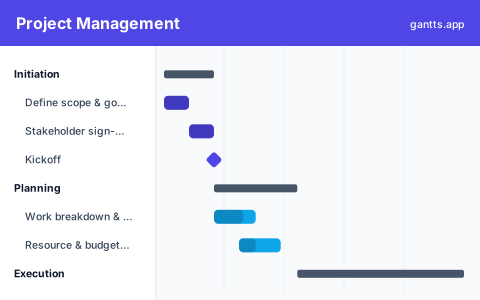
The template mirrors the classic project lifecycle, with each phase pre-filled so you can adapt rather than invent structure:
- Initiation, business case, stakeholder identification, project charter and kickoff. Milestone: charter approved.
- Planning, scope and work-breakdown structure, schedule, budget, resource and risk plans. Milestone: plan baselined.
- Execution, the core delivery work, grouped into your project's own workstreams and deliverables.
- Monitoring & control, status reporting, change control, quality and risk reviews, running in parallel with execution.
- Closeout, final delivery, sign-off, lessons learned and handover. Milestone: project closed.
Who uses this template
Project managers, team leads, and coordinators across almost any industry use this as a general-purpose starting point. Its five phases from initiation through planning, execution, monitoring, and closeout mirror standard project methodology, making it a reliable scaffold for a new plan when you want structure without building from a blank page.
How to customize it
- Set the project start and let the phases sequence from there.
- Replace execution tasks with your project's real deliverables and workstreams, this is the phase that varies most.
- Assign owners and, if you track it, effort or resource per task.
- Link dependencies so downstream work moves automatically when a predecessor shifts.
- Add gate reviews as milestones so approvals and go/no-go decisions are visible on the timeline.
Project scheduling tips
- Baseline before you start. Save your original plan as a reference so you can see how far actuals drift from the baseline.
- Manage the critical path first. Non-critical tasks have float; the critical ones don't. Focus attention where a delay directly moves the end date.
- Keep phases overlapping realistically. Planning rarely finishes before execution begins, model the overlap rather than forcing a hard handoff.
- Report from the chart. Update % complete and export to PDF or PowerPoint for a clean, consistent status report each cycle.
- Review risks on a cadence. Keep the monitoring & control tasks live for the whole project, not just at the start.
Related templates
- Construction template, a phased plan for build projects.
- Software development template, an agile, sprint-based variant.
- Simple Gantt chart template, a lighter starting point for smaller efforts.
Frequently asked questions
What phases does the project management template use?
It follows the five standard project phases, initiation, planning, execution, monitoring and control, and closeout, each with example tasks and milestones you can adapt to any project.
Does it show the critical path?
Yes, when you open it in the free gantts.app editor. Link your dependencies and the critical path, the chain of tasks that determines your finish date, is calculated and highlighted automatically.
Is this template right for any industry?
Yes. It's a generic, industry-agnostic plan. Use it as a starting framework for IT, operations, product, consulting or internal projects, then add the tasks specific to your work.
Is the project management Gantt chart template free?
Yes. It is free to download and free to edit online with no sign up, and export to PDF, PNG, Excel and PowerPoint is free too.