
What's included
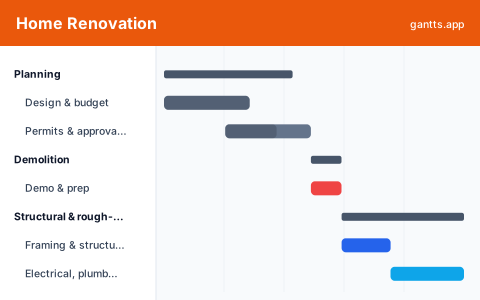
The template is organized into the phases of a typical remodel, each pre-filled with common tasks and inspection milestones so you can adapt a real renovation timeline rather than start from a blank page:
- Planning, design and budget, then permits and approvals. Milestone: permits approved.
- Demolition, strip-out, disposal and site prep for the trades.
- Structural & rough-in, framing, then electrical, plumbing and HVAC rough-in. Milestone: rough-in inspection passed.
- Finishes, drywall, paint, flooring and the final inspection. Milestone: project complete.
The renovation phases explained
A remodel is a chain of dependencies, and getting the order wrong is expensive. Planning locks the design and, critically, the permits, because nothing legitimate starts before they're approved. Demolition clears the way. Structural and rough-in is where framing goes up and the electrical, plumbing and HVAC get run inside the walls, all of which must pass inspection before anything gets closed up. Only then do finishes go on. Seeing it as a Gantt makes the sequence obvious and stops trades from being booked out of order.
Permits, contractors & inspections
Three things derail renovations most: permits that arrive late, trades that overlap badly, and inspections that fail and force rework. This template puts permits at the front of the timeline, gives each trade its own bar with an owner so contractors don't collide, and treats every inspection as a milestone gate. When you open it in the editor you can link dependencies so a failed rough-in inspection visibly pushes drywall and everything after it, no guessing about the new finish date.
Who uses this template
Homeowners, general contractors, and interior designers use this to keep a remodel on track and trades in the right order. It covers permits, demolition, the sequence of trades, and the final walkthrough, making it clear why plumbing precedes drywall and helping everyone see how a slip in one stage pushes the finish date.
How to customize it, edit online free
- Open the template in the free editor at app.html?csv=home-renovation.
- Set the project start date and let the phases cascade from there.
- Add room- or trade-specific tasks, kitchen cabinets, tiling, landscaping.
- Assign contractors in the Owner column so each trade knows its window.
- Export to PDF, PNG, Excel or PowerPoint for contractor and lender meetings.
Renovation planning tips
- Get permits early. They're the most common cause of a delayed start, put them first and add buffer.
- Order long-lead items up front. Custom cabinets, windows and tile can take weeks; schedule them during planning so they don't stall finishes.
- Treat inspections as hard gates. Don't let a trade start work that a failed inspection would force you to redo.
- Build in contingency. Renovations uncover surprises behind walls, add float so one discovery doesn't blow the whole schedule.
Download formats
Grab the Excel (.xlsx), PowerPoint or CSV version above, or skip the download and edit online free. Browse more building options in the templates library.
Related templates
- Construction template, a full phased build schedule from ground up.
- Real estate development template, plan a larger property project end to end.
- Moving house template, coordinate a move once the remodel is done.
Frequently asked questions
What phases are in the home renovation template?
It covers planning (design, budget and permits), demolition, structural and rough-in (framing, electrical, plumbing, HVAC), and finishes (drywall, paint, flooring, final inspection), ending in a project-complete milestone.
Can I show dependencies between trades?
Yes. Open the template in the free gantts.app editor to link finish-to-start dependencies, so drywall can't start before rough-in passes inspection and downstream trades shift automatically when something slips.
Does it handle permits and inspections?
Yes. Permits sit in the planning phase and inspections are milestones between phases, so you can treat each sign-off as a hard gate that work can't proceed past until it's passed.
Is the home renovation template free?
Yes. It is free to download and free to edit online with no sign up, and exporting to PDF, PNG, Excel and PowerPoint is free too.