
What's included
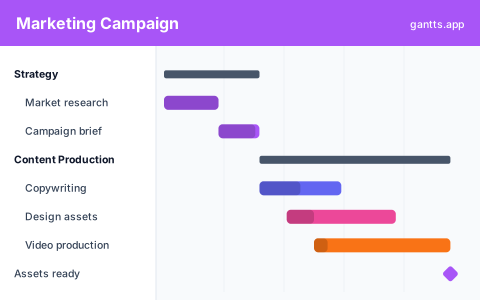
The template is organized by workstream so each team can find its lane, with a launch milestone everything ladders up to:
- Strategy & planning, goals and KPIs, audience and messaging, budget and channel plan. Milestone: plan approved.
- Content, blog posts, email sequences, social copy, video scripts and SEO briefs.
- Design & creative, ad creative, landing-page design, social graphics and brand assets.
- Website, landing pages, tracking and analytics setup, QA. Milestone: pages live.
- Paid & PR, ad account setup, campaign builds, influencer / press outreach and scheduling.
- Launch week, coordinated go-live across channels. Milestone: campaign launch.
- Post-launch, monitoring, optimization and a results readout.
Who uses this template
Marketing managers, campaign leads, and content teams use this to plan a campaign end to end. It sets a timeline across content, design, paid media, and launch so writers, designers, and media buyers can see dependencies and deadlines, and stakeholders get one clear view of what ships when in the run-up to launch.
How to customize it
- Anchor the launch date and let the plan flow backwards from there.
- Keep the channels you run and delete the rest, not every campaign needs PR or video.
- Assign owners so content, design, web and paid each know their tasks.
- Link dependencies, e.g. ad creative waits on final copy; landing page waits on design.
- Add approval milestones for legal, brand or client sign-off so reviews aren't forgotten.
Campaign scheduling tips
- Build in review cycles. Creative and copy almost always need a round or two of edits, schedule the review, not just the first draft.
- Stagger, don't stack. If design feeds paid, paid, and social, sequence those so one late asset doesn't block three teams at once.
- Front-load content. SEO and long-form content take time to produce and, for organic, time to rank, start them well before launch.
- Protect launch week. Keep the days right before go-live light so there's slack to handle last-minute fixes.
- Share the timeline as a deck. Export to PowerPoint for stakeholder and client updates so everyone sees the same plan.
Related templates
- Event planning template, for launch events and webinars.
- Software development template, pair a product launch with its build plan.
- PowerPoint template, present the campaign timeline to stakeholders.
Frequently asked questions
What does the marketing Gantt chart template cover?
It lays out a full campaign: strategy and planning, content production, design and creative, website and landing pages, paid and PR, launch week, and post-launch analysis, with milestones for approvals and go-live.
Can I plan backwards from a launch date?
Yes. Set your launch date as a milestone and use dependencies so that asset deadlines pull earlier automatically. If the launch moves, the whole plan re-times itself in the online editor.
Is it good for coordinating multiple teams?
Yes. Assign each task an owner and group work by channel so content, design, web and paid teams can see how their deadlines depend on each other on one shared timeline.
Is the marketing Gantt chart template free?
Yes. It is free to download and free to edit online with no sign up, and export to PDF, PNG, Excel and PowerPoint is free too.