
Agile and Gantt charts, together
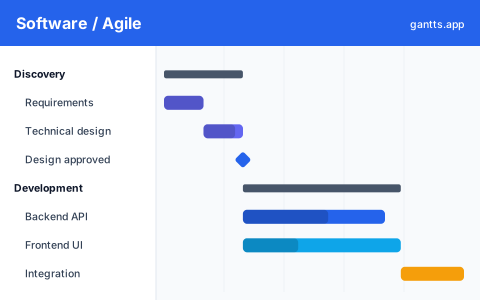
Sprint boards are great for the day-to-day, but they don't answer the questions leadership actually asks: when will this feature ship? what depends on what? are we on track for the launch date? A Gantt chart complements your board by giving a release-level, time-based view. This template treats each sprint as a time-boxed container and lays epics across them, with hard milestones for kickoff, feature-complete, code freeze and release.
What's included
- Discovery & planning, requirements, technical design, backlog grooming and estimation. Milestone: kickoff.
- Design, UX flows, UI design and design review, running slightly ahead of development.
- Development sprints, a series of two-week sprints, each holding one or more epics (e.g. auth, core features, integrations, admin).
- QA & hardening, test planning, regression, bug-fix buffer and performance testing. Milestone: feature-complete → code freeze.
- Release, staging, UAT, deployment, and post-launch monitoring. Milestone: launch.
Who uses this template
Engineering managers, product owners, and development team leads use this to plan a build from discovery to release. Structured around agile sprints, it puts stories, ceremonies, and dependencies on a shared timeline so stakeholders can see when features land and engineers can flag where a slipped dependency threatens the release date.
How to customize it
- Set your sprint cadence. Change the sprint length (1, 2 or 3 weeks) and align the dates to your team's calendar.
- Drop in your epics. Replace the example epics with your real features and slot them into the right sprints.
- Assign squads. Use the Owner column for the team or engineer responsible for each epic.
- Mark the gates. Keep feature-complete, code freeze and release as milestones so scope creep is visible.
- Track progress with % complete each sprint and re-export for stakeholder updates.
Scheduling tips for engineering teams
- Plan capacity, not just dates. Don't stack more epics into a sprint than the team's velocity supports, an over-full sprint pushes everything downstream.
- Protect a hardening buffer. Reserve a QA/bug-fix window before release; teams that skip it ship the slip as bugs instead.
- Show cross-team dependencies. If your feature waits on a platform or API team, model that dependency so the risk is explicit.
- Use the critical path to see which epics actually gate the launch, those are the ones to de-risk first.
- Pair it with your board. Keep the Gantt for the roadmap and milestones; keep Jira/Linear for the task detail.
Related templates
- Project management template, a generic phased plan for non-agile work.
- Marketing plan template, pair a launch with its go-to-market timeline.
- Simple Gantt chart template, a lightweight starter for a small feature.
Frequently asked questions
Can a Gantt chart work with agile and sprints?
Yes. A Gantt chart is useful for the release-level and roadmap view that a sprint board doesn't show, sequencing epics across sprints, tracking milestones like code freeze and release, and giving stakeholders a timeline. Use it alongside your sprint board, not instead of it.
What's in the software development template?
It includes discovery and planning, design, a series of development sprints with epics, QA and hardening, and a release phase, plus milestones for kickoff, feature-complete, code freeze and launch.
Can I show dependencies between epics?
Yes. Open the template in the free gantts.app editor to link dependencies between epics and phases so the timeline and critical path update automatically when a sprint shifts.
Is the software development Gantt chart template free?
Yes. It is free to download and free to edit online with no sign up, and export to PDF, PNG, Excel and PowerPoint is free too.