
What's included
A contact centre stands or falls on whether trained people are on the floor the week volume arrives. The template treats hiring and training as the driving sequence and everything else as support for it:
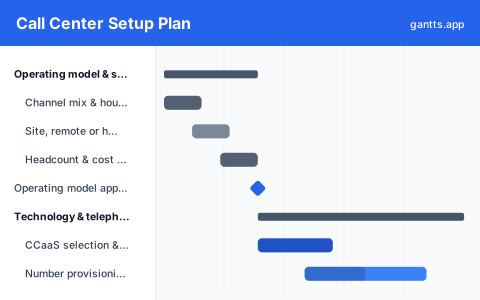
- Operating model & site, Channel mix, hours of operation, on-site, remote or hybrid decision, location or work-from-home policy, and the headcount and cost model. Milestone: operating model approved.
- Technology & telephony, CCaaS and telephony selection, number provisioning and porting, CRM and ticketing integration, IVR and routing design, workforce management and quality tooling, plus connectivity or headset logistics.
- Workforce planning, Volume forecast by interval, average handle time assumptions, Erlang staffing model, shrinkage, shift patterns and the hiring numbers each wave has to deliver.
- Recruitment waves, Job design and pay banding, sourcing, assessment days and offers, run as successive waves timed so each cohort finishes training before the volume it was hired for arrives.
- Training & knowledge, Curriculum build, knowledge base and macros, systems and soft-skills training per cohort, nesting with live-call support, and certification. Milestone: cohort 1 certified.
- Pilot, go-live & ramp, Pilot calls on a limited queue, quality calibration, go-live, staged volume ramp per cohort, and the move to steady-state service levels. Milestone: steady state.
Who uses this template
Operations leaders, workforce planners, and contact-center project managers use this plan to stand up a new call center or CCaaS platform. It sequences technology procurement, demand forecasting, hiring waves, and training cohorts toward pilot calls and go-live, so staffing and systems mature together and the ramp to full volume stays under control.
How to customize it
- Set your go-live and volume ramp dates first, then push each hiring wave back by the full recruit-plus-train-plus-nest duration.
- Over-recruit each wave for training attrition, add the percentage your business actually sees rather than assuming everyone certifies.
- Add one row per cohort if you are running more than the three waves shown.
- Adjust nesting length to your product complexity; regulated or technical queues need longer live-call support.
- Move number porting earlier if you are migrating existing lines, carrier porting is a third-party wait you cannot compress.
- Add language or channel rows if you are launching chat and email alongside voice.
Scheduling tips
- Port numbers early. Carrier porting is the one item on this plan with a third-party clock, and it gates every routing test that depends on the real number.
- Build the knowledge base before training, not during. Trainers writing content while teaching is how cohort one ends up trained on material cohort two never sees.
- Protect nesting. The supervised live-call period is where handle time and quality actually settle; cutting it to hit a date reappears as a service-level problem for a quarter.
- Pilot on a real but limited queue. Routing, wrap-up codes and escalation paths only fail properly with live callers on the line.
- Ramp volume in steps. Move to the next step only when quality and handle time hold at the current one, the ramp is a series of gates, not a slope.
Related templates
- Recruitment and Hiring Plan Template
- Free Employee Onboarding Gantt Chart Template
- Warehouse Setup Project Plan Template
- Browse all Gantt chart templates
Frequently asked questions
How long does it take to set up a call center?
Commonly four to six months from operating model approval to go-live, with the ramp to steady state running a further two to three. The template uses a roughly six-month build and a staged ramp after it.
What drives the timeline?
Hiring and training. Technology can be procured and configured in parallel, but a cohort takes weeks to recruit and weeks more to train and nest, so the training academy sits on the critical path to go-live.
How many agents should be in the first wave?
Enough to cover the opening volume plus shrinkage and training attrition, which usually means recruiting meaningfully more than the seat count. The template shows three waves so later cohorts can be sized off what wave one actually taught you.
Does this work for a remote or hybrid centre?
Yes. Drop the site fit-out rows and keep the equipment logistics, connectivity checks and remote onboarding tasks, the hiring and training sequence is identical.