
What's included
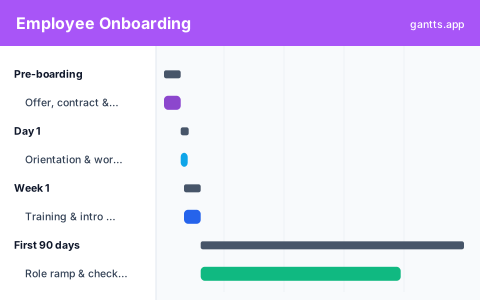
The template is organized into the natural phases of onboarding, each pre-filled with common HR tasks and milestones so you can adapt rather than build a new hire timeline from scratch:
- Pre-boarding, send and confirm the offer, background checks, provision IT accounts and equipment, prepare the workspace. Milestone: ready for Day 1.
- Day 1, orientation, welcome, paperwork, systems access and introductions.
- Week 1, role training, tooling walkthroughs, and intro meetings with the team and key stakeholders.
- First 90 days, role ramp, assigned first projects, and regular check-ins with the manager and buddy.
- 90-day review, probation review and feedback. Milestone: onboarding complete.
Pre-boarding → first 90 days
Great onboarding starts before Day 1. The pre-boarding band covers everything that has to be ready, signed offer, equipment, accounts, desk or remote setup, so a new hire's first morning is welcoming rather than chaotic. From there the timeline moves through a structured Day 1, a training-heavy first week, and a gentler 90-day ramp with scheduled check-ins. Laying it out as a Gantt makes gaps obvious: if IT provisioning runs late, you can see immediately that it threatens the Day 1 milestone.
Roles & responsibilities
Onboarding fails when everyone assumes someone else owns a task. This template uses the Owner column so each item is clearly assigned, HR for paperwork and reviews, IT for accounts and equipment, the hiring manager for role goals, and an onboarding buddy for day-to-day questions. When you open it in the editor, you can color or group by owner so each team sees exactly what they're on the hook for and by when.
Who uses this template
HR teams, People Ops, and hiring managers use this schedule to onboard a new employee from offer acceptance onward. It lays out pre-boarding, a structured first week, and 30-, 60-, and 90-day milestones, coordinating IT setup, training, and check-ins so new hires feel supported and reach full productivity on a predictable track.
How to customize it, edit online free
- Open the template in the free editor at app.html?csv=employee-onboarding.
- Set Day 1 to the new hire's real start date so every phase lands correctly.
- Assign owners, HR, IT, hiring manager, buddy, in the Owner column.
- Add role-specific training under week 1 and the 90-day ramp.
- Export to PDF, PNG, Excel or PowerPoint to share the plan with everyone involved.
HR onboarding tips
- Nail pre-boarding. Equipment and account delays are the most common Day 1 failures, schedule them with buffer.
- Don't cram Day 1. Spread training across week 1 so the new hire isn't overwhelmed on the first morning.
- Schedule the check-ins. Put 30-, 60- and 90-day manager check-ins on the timeline so they actually happen.
- Reuse the template. Save it as your standard onboarding playbook and clone it for each new hire.
Download formats
Grab the Excel (.xlsx), PowerPoint or CSV version above, or skip the download and edit online free. Browse more HR options in the templates library.
Related templates
- 30-60-90 day plan template, the new hire's own first-90-days goals.
- Recruitment template, the hiring pipeline that leads into onboarding.
- HR project template, plan broader people-team initiatives.
Frequently asked questions
What does the employee onboarding template cover?
It spans pre-boarding through the first 90 days: offer and equipment setup before Day 1, orientation on Day 1, training and intro meetings in week 1, role ramp and check-ins across the first 90 days, and a 90-day review milestone.
How is onboarding different from a 30-60-90 day plan?
The onboarding template is the HR and manager view, the tasks the company does to set up a new hire. A 30-60-90 day plan is the employee's own goals. They complement each other, and you can link to both.
Can I assign onboarding tasks to different teams?
Yes. Open the template in the free gantts.app editor and use the Owner column to assign each task to HR, IT, the hiring manager or an onboarding buddy, then export a shared timeline.
Is the employee onboarding template free?
Yes. It is free to download and free to edit online with no sign up, and exporting to PDF, PNG, Excel and PowerPoint is free too.