
What's included
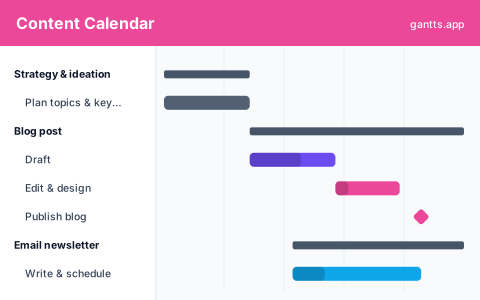
The template maps a typical content pipeline as phases, each pre-filled with the stages a piece moves through so you can adapt an editorial calendar rather than start from a blank grid:
- Strategy & ideation, topic research, keyword planning, and the content calendar for the period.
- Blog post, draft, edit & design, then publish. Milestone: post published.
- Email newsletter, write, build and schedule the send tied to the blog post.
- Social promotion, create assets and schedule posts across channels to amplify the piece.
Your content pipeline on a timeline
A grid calendar tells you what publishes on which day. A Gantt content calendar tells you the whole story: when drafting starts, how long editing and design take, and when promotion kicks in. That end-to-end view is where content plans usually break, a post scheduled for Friday that only starts drafting on Thursday. Seeing the pipeline on a timeline makes those crunches obvious well before deadline, so you can rebalance work across the week or month.
Channels, owners & deadlines
Every piece has three things this template makes explicit: a channel (blog, email, social), an owner (writer, editor, designer), and a deadline (the publish milestone). When you open it in the editor you can color by channel or group by owner, so each person sees their queue and every deadline is a visible milestone. Dependencies keep the sequence honest, social promotion can't go out before the blog post publishes.
Who uses this template
Content marketers, editorial teams, and social media managers use a content calendar to plan blog, email, and social output across weeks or months. Placing pieces on a timeline with owners and deadlines, it shows how production, review, and publishing overlap so the team maintains a steady cadence and never scrambles to fill a gap.
How to customize it, edit online free
- Open the template in the free editor at app.html?csv=content-calendar.
- Add each content piece as a bar with its draft, edit and publish dates.
- Tag channel and owner so blog, email and social are all visible at once.
- Link promotion to publish milestones so social and email follow the post automatically.
- Export to PDF, PNG, Excel or PowerPoint to share the calendar with your team or clients.
Editorial workflow tips
- Work backfrom the publish date. Set the milestone first, then schedule drafting and editing back from it with buffer.
- Batch by stage. Grouping all drafting or all design into blocks is more efficient than context-switching per piece.
- Make promotion a dependency. Tie email and social to the publish milestone so amplification never gets forgotten.
- Plan a full month at a time. A monthly or quarterly horizon keeps your pipeline full and avoids last-minute scrambles.
Download formats
Grab the Excel (.xlsx), PowerPoint or CSV version above, or skip the download and edit online free. Explore more marketing options in the templates library.
Related templates
- Social media calendar template, plan posts across social channels.
- Marketing plan template, the broader campaign timeline your content feeds.
- SEO project template, plan an SEO content and optimization program.
Frequently asked questions
What does the content calendar template include?
It maps a content pipeline on a timeline: strategy and ideation, a blog post workflow (draft, edit and design, publish), an email newsletter, and social promotion, each with owners and deadlines you can edit.
How is a Gantt content calendar better than a grid calendar?
A grid shows publish dates; a Gantt shows the whole production timeline, drafting, editing, design and promotion, so you can see workload, spot bottlenecks, and catch pieces that won't be ready in time.
Can I plan multiple channels at once?
Yes. Open the template in the free gantts.app editor and add rows for blog, email and social, tag each with a channel and owner, and color-code so the full editorial calendar is readable at a glance.
Is the content calendar template free?
Yes. It is free to download and free to edit online with no sign up, and exporting to PDF, PNG, Excel and PowerPoint is free too.