
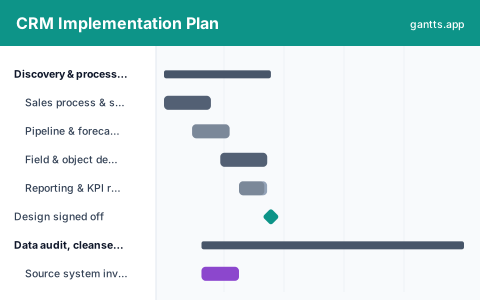
What's included
Everybody budgets for configuration and nobody budgets for the data. But a rep who opens the new CRM and sees three copies of their biggest account stops using it that morning, and no amount of training recovers that:
- Discovery & process design, Sales process and stage definitions, pipeline and forecast definitions, field and object design, and the reporting requirements the whole configuration is sized against. Milestone: design signed off.
- Data audit, cleanse & dedupe, Source extracts, quality profiling, match keys and deduplication rules, the automated pass, the records only sales can fix, and account hierarchy clean-up. This runs for months in parallel. Milestone: data ready for migration rehearsal.
- Configuration & integration, Objects, workflows and validation, permissions and territory model, email, calendar and telephony, marketing automation sync, quoting and ERP integration, and the forecast dashboards. Milestone: configuration complete.
- Migration rehearsals, Two full rehearsals with reconciliation and sales validation between them, then a timed run at full volume that proves the load fits the cutover window. Milestone: migration rehearsal signed off.
- Training & adoption, Role-based content, manager forecasting workshops first, then rep cohorts timed to land close to go-live, plus the champion network and floor support plan. Milestone: training complete.
- Cutover & first forecast cycle, The quarter-boundary window, legacy freeze, production load, pipeline reconciliation against the old system, go-live, hypercare, and the first full forecast cycle run in the new CRM. Milestone: go-live.
Who uses this template
CRM project leads, RevOps teams, and Salesforce or HubSpot admins use this plan to roll out a new system. It sequences process design, data cleanse and dedupe, configuration, and migration rehearsals toward a cutover timed to a quarter boundary, coordinating the sales, marketing, and IT stakeholders whose sign-off the go-live depends on.
How to customize it
- Set the cutover in the first two weeks of a quarter, then count backwards; the final rehearsal should finish at least three weeks before it.
- Break the dedupe rows out per object, accounts, contacts, leads, opportunities, because the match keys and the owners are different for each.
- Push rep training as late as it will go without colliding with cutover; training people six weeks early means training them twice.
- Add rows per integration if quoting, ERP or marketing automation have their own vendor dependencies.
- Keep sales-owned record remediation as a named row with a named owner, it is business work, not a data team task.
- Add a row for the historical activity decision; migrating five years of emails and calls is usually the single most expensive choice in the plan.
Scheduling tips
- Deduplicate before you configure, not after. Duplicate accounts break territory assignment, forecast roll-up and reporting all at once, and every one of those has to be redone if the data changes underneath it.
- Reconcile pipeline value against the legacy system on cutover day. If the two numbers do not match before anybody logs in, you will spend the quarter arguing about which one is real.
- Train managers before reps. Adoption is enforced in one-to-ones; a manager who cannot run their own pipeline review in the new tool will quietly let the team keep using spreadsheets.
- Migrate less history. Open opportunities and the last two years of activity cover almost every real use; the rest is an archive question, not a migration question.
- Measure adoption, not go-live. Logins prove nothing. Track whether deals have next steps, close dates and stage movement, that is what makes the pipeline trustworthy.
Related templates
- ERP Implementation Schedule Template
- Data Migration Project Plan Template
- Change Management Plan Template
- Browse all Gantt chart templates
Frequently asked questions
How long does a CRM implementation take?
Commonly four to nine months for a mid-sized sales organisation, depending almost entirely on data quality and integration count. The template uses roughly eleven months end to end because it includes the data cleanse from the start and a full forecast cycle after go-live.
Why is data migration the critical path rather than configuration?
Because configuration is bounded work you control and data is not. Profiling finds problems, deduplication needs business decisions, and sales-owned remediation runs at the speed of people who have quota. The template starts data work in month one for that reason.
When should we cut over?
At a quarter boundary, in the first two weeks of a new quarter. Mid-quarter cutovers split the forecast across two systems, and a forecast nobody trusts is the fastest way to lose sales adoption permanently.
How many migration rehearsals do we need?
At least two plus a timed run. The first tests the mapping, the second tests the deduplicated data with real sales validation, and the timed run at full volume proves the load fits the cutover window you have booked.
How does this relate to the change management template?
This plan covers the system. The change management plan covers the people workstream that runs alongside it, impact assessment, sponsor roadshows, training cohorts and post-launch reinforcement. Large CRM programmes need both.