
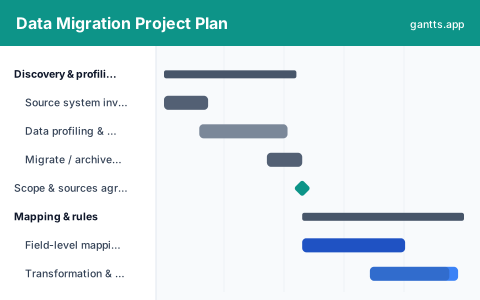
What's included
Migration plans go wrong when the load is treated as one task at the end. It is not one task, it is the same task run several times until the reconciliation agrees, and each run costs an outage window:
- Discovery & profiling, Source system inventory, data volumes, ownership, profiling for nulls, duplicates and format breaks, and the scope decision on what actually migrates. Milestone: scope and sources agreed.
- Mapping & rules, Field-level mapping per object, transformation and default rules, reference data alignment and the reconciliation rules you will test against. Milestone: mapping signed off.
- Cleansing, Cleansing rules, business owner remediation of records the rules cannot fix, and the deduplication pass, work that runs in parallel because it has no dependency on the build.
- Build & unit test, ETL or migration tooling build per object, extract and load scripts, error handling, restart logic and the reconciliation reports themselves.
- Mock loads & reconciliation, Three full mock loads with reconciliation and defect fix between each, plus the timed dress rehearsal that proves the load fits the outage window. Milestone: dress rehearsal passed.
- Cutover & verification, Source freeze, delta extract, the production load, reconciliation sign-off, business verification and fallback decision. Milestone: data accepted.
Who uses this template
Data leads, ETL developers, and project managers use this plan when moving records between systems during an upgrade or consolidation. It sequences profiling, mapping, cleansing, and repeated mock loads toward a cutover load and verification, with reconciliation built in so the team can prove data landed completely and correctly before switching over.
How to customize it
- Fix the cutover date first and count backwards; the last mock load needs to finish at least two weeks before it.
- Expand the per-object rows to one line per data object, customers, vendors, products, open transactions, history, once mapping starts.
- Book each mock load as a real outage window with the same people who will run cutover, not a subset.
- Add a row for the delta extract if your source stays live between the final mock and cutover.
- Keep the fallback decision as a dated milestone with named criteria, not an implied option.
- Drop this whole plan in as a sub-plan under your ERP or cloud migration schedule.
Scheduling tips
- Reconciliation rules come before the build. If you cannot state how you will prove the load is correct, you cannot know when it is finished.
- Time every mock load end to end. The number you need is not "did it work" but "how many hours", because that is what the cutover window is sized against.
- Start cleansing early. It depends on profiling, not on the build, so it can run for months in parallel, and it always takes longer than expected because it needs business people, not the data team.
- Migrate less. History is the most expensive part of any migration; a decision to archive rather than migrate is worth more schedule than any tuning effort.
- Baseline at mapping sign-off. Everything before it is estimation; everything after it should be tracked as variance.
Related templates
- ERP Implementation Schedule Template
- Cloud Migration Project Plan Template
- Post-Merger Integration Plan Template
- Browse all Gantt chart templates
Frequently asked questions
How long does a data migration take?
For a mid-sized system replacement, commonly four to eight months from profiling to verified cutover. The template uses a roughly seven-month schedule; the mock load cycle at the end is the part that resists compression.
How many mock loads do you need?
Three is the working minimum. The first tests the mapping, the second tests the cleansing, and the third is a timed dress rehearsal at production volumes that proves the load fits your outage window. Each needs its own window and its own reconciliation.
Is this different from the ERP or cloud migration templates?
Yes, this is the data workstream that runs inside either. Use the ERP implementation schedule or the cloud migration plan for the whole programme, and this one when data needs its own detailed plan and its own owner.
What usually causes a migration to slip?
Data quality found late during the first mock load, and reconciliation differences nobody can explain. Both are found by loading early rather than by planning harder.