
What's included
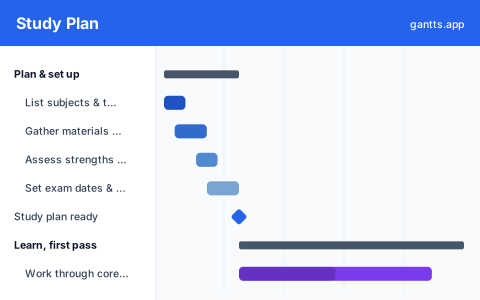
Most revision fails not from too little effort but from no plan, cramming the easy topics and running out of time for the hard ones. This template lays your whole revision on one timeline, in the six stages that actually get you exam-ready:
- Plan & set up, List your subjects and topics, gather your materials, honestly assess your strengths and gaps, and set your exam dates and target grades. Milestone: study plan ready.
- Learn, first pass, Work through the core topics for the first time, make notes and flashcards as you go, and use a weekly review to catch up. Milestone: first pass complete.
- Practice & active recall, Do practice questions by topic, run spaced-repetition flashcards, and sit your first timed past paper. Milestone: practice underway.
- Revise weak areas, Identify and re-study the topics you scored worst on, and condense them into summary sheets and mind maps. Milestone: weak areas consolidated.
- Mock exams & final review, Sit full timed mock exams, review the results, and finish your summaries, then rest. Milestone: ready for exams.
- Exam week, Sort the logistics, sit the exams, and finish. Milestone: exams complete.
Who uses this template
Students, exam candidates and self-learners use this plan to prepare for exams without cramming the easy topics and running out of time for the hard ones. It suits school, university and professional-certification study, from listing topics and building a weekly revision timetable through practice and mock exams to exam week.
How to customize it
- Set your exam date first and work backwards; three to eight weeks is typical, but block out the days you genuinely cannot study.
- Add a row per subject (or per topic) under Learn and Practice so a multi-subject plan shows each one’s progress.
- Front-load your weakest subjects, put the hard topics early, while your energy and runway are highest.
- Schedule breaks and lighter days; a plan with no rest is one you will abandon in week two.
- Mark “study plan ready”, “first pass complete” and “weak areas consolidated” as milestones so you can see whether you are on track.
Scheduling tips
- Active recall beats re-reading. Testing yourself, flashcards, practice questions, sticks far better than highlighting; the schedule should weight practice heavily, not just reading.
- Past papers are the highest-value task. A timed past paper reveals both what you do not know and how you manage exam time; put your first one early, not the week before.
- Space your revision, do not mass it. Revisiting a topic across several days beats one long session; the flashcard track runs the whole plan for that reason.
- Review your mock results, do not just sit them. The learning is in going through what you got wrong; schedule the review, not only the mock.
- Protect the last few days for rest. Cramming the night before costs more in fatigue than it adds in recall; the plan ends with review and rest, not new material.
Related templates
- Dissertation Gantt Chart Template
- PhD Research Gantt Chart Template
- School Year Planning Calendar Template
- Browse all Gantt chart templates
Frequently asked questions
How far in advance should I start a study plan?
Three to eight weeks before your exams is typical, enough time for a first pass, practice and revision without burning out. The template spreads planning, learning, practice, revision and mocks across a timeline so you can see whether your runway is realistic.
What should a study plan include?
A topic list, a weekly timetable, time for learning, active-recall practice (flashcards and past papers), targeted revision of weak areas, timed mock exams and rest. The template gives each stage its own phase, with milestones you can track.
Can I show dependencies between study tasks?
Yes. Open the template in the free gantts.app editor to link finish-to-start relationships (learn → practise → revise → mock) so if you fall behind, the later work shifts automatically and your critical path to exam day stays visible.