
What's included
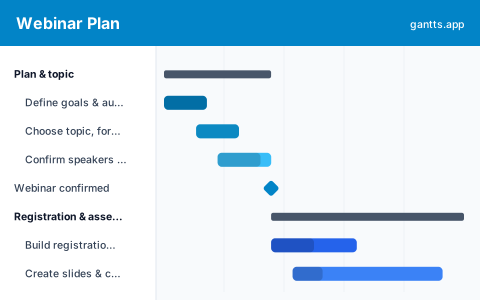
Webinars fail on the parts either side of the live hour, too little promotion runway, or no follow-up plan. This template puts the whole webinar on one timeline, in the six stages it actually moves through:
- Plan & topic, Set the goal and audience, choose the topic, format and date, and confirm your speakers and platform. Milestone: webinar confirmed.
- Registration & assets, Build the registration and landing page, create the slides and content, and design the promotion assets. Milestone: assets ready.
- Promotion, Announce the webinar and run the email sequence, social and partner promotion, and any paid ads to fill seats. Milestone: registration goal reached.
- Rehearsal & prep, Prep the speakers and review the content, run a tech check and dry run, and send reminder emails. Milestone: ready to go live.
- Live event, Go live and host, and moderate the Q&A and engagement. Milestone: webinar delivered.
- Follow-up, Publish the recording, send follow-up emails, hand leads to sales, and measure the results. Milestone: post-webinar review.
Who uses this template
Marketing, demand-generation and events teams use this plan to run a webinar without promotion runway, speaker prep and follow-up falling through the cracks. It suits B2B marketers and product teams running lead-generation or educational webinars, from topic and registration through promotion and the live event to lead follow-up.
How to customize it
- Give promotion at least three to four weeks, most registrations come in the first and last week, but you need the runway between.
- Set the registration goal as a milestone and watch it; if you are behind at the halfway point, add promotion rather than hoping.
- Run slide creation in parallel with the registration page, they have different owners and no dependency on each other.
- Add a row per promotion channel (email, social, partners, paid) so each has its own owner and cadence.
- Mark webinar confirmed, assets ready and “ready to go live” as milestones so nothing downstream starts before its inputs exist.
Scheduling tips
- Promotion runway is the critical path to attendance. Seats fill over weeks, not days; protect the promotion window rather than compressing it to hit a date.
- Always run a dry run. The tech check and full rehearsal catch the audio, screen-share and hand-off problems that otherwise happen live; schedule it as a hard gate before go-live.
- Build the follow-up before the event. The recording, nurture emails and sales hand-off should be drafted in advance so they go out while interest is warm.
- Send reminders, they drive show-up rate. A one-day and one-hour reminder often lifts attendance sharply; put them on the schedule, not in memory.
- Measure against the goal. Tie the wrap-up back to the registration and pipeline targets from the plan, a webinar that ran but generated no follow-up has not finished.
Related templates
- Conference Production Schedule Template
- Trade Show Planning Timeline Template
- Marketing Plan Gantt Chart Template
- Browse all Gantt chart templates
Frequently asked questions
How far in advance should I plan a webinar?
Most webinars need four to eight weeks, enough runway for promotion and speaker prep. The template spreads planning, registration, promotion, rehearsal, the live event and follow-up across a timeline so you can see whether your date is realistic.
What should a webinar plan include?
At minimum: goal and topic, speakers and platform, a registration page, a promotion sequence, a rehearsal and tech check, the live event, and a follow-up plan. The template gives each its own phase with milestones and owners.
Can I show dependencies between webinar tasks?
Yes. Open the template in the free gantts.app editor to link finish-to-start relationships (confirm → build → promote → rehearse → go live) so downstream work shifts automatically and the critical path stays visible.