
What's included
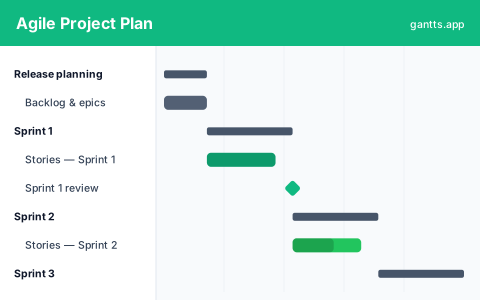
The template is organized around a release made of sprints, each pre-filled with typical items and milestones so you can adapt rather than start from a blank page:
- Release planning, backlog grooming and epic definition that seed the sprints ahead.
- Sprint 1, the first slice of committed work. Milestone: Sprint 1 review.
- Sprint 2, the next increment, building on Sprint 1's outcomes.
- Sprint 3, the final increment before the release.
- Release, the point where the increment ships. Milestone: release.
Who uses this template
Delivery leads, product owners, and scrum masters use an agile Gantt view to show sprints, epics, and releases on a single timeline for stakeholders who want dates rather than a backlog. It bridges iterative delivery and roadmap-level reporting, keeping executives and clients aligned on when features land without disrupting the team's sprint cadence.
Can agile use a Gantt chart?
Yes, and the two aren't in conflict once you use them at the right altitude. Agile teams keep the sprint backlog on a board where cards move freely. But leadership, sales and cross-team partners still ask "when will this land?" A Gantt view answers that at the epic and release level: it shows the shape of the plan over time without dictating how each sprint runs internally. This template deliberately stays coarse, epics and sprints, not individual tickets, so it communicates a timeline while leaving execution to the team.
Epics, sprints & releases on a timeline
Each sprint is a fixed-length container; each epic is a bar spanning the sprints it takes to complete. Sprint reviews and the release are milestones, the fixed checkpoints stakeholders track. Because it all sits on one timeline, a spillover in Sprint 1 visibly pushes the release rather than disappearing into velocity charts. That visibility is the whole point of an agile roadmap: honest dates that still flex sprint to sprint.
How to customize free
- Set your sprint length and start date and let the sprints repeat from there in the free online editor.
- Add your epics and stretch each bar across the sprints it will take.
- Rename the sprints to match your naming or numbering scheme.
- Mark reviews and the release as milestones so the cadence is visible.
- Link dependencies between epics so the release date reflects reality.
Agile planning tips
- Plan at the epic level, execute on the board. Keep this timeline coarse so it stays true even as tickets shuffle.
- Fix the cadence, flex the scope. Sprint dates are stable; what fits inside them is the variable you manage.
- Make the release a milestone. A visible release diamond forces honest conversations about scope when a sprint slips.
- Re-plan every sprint. Update % complete and re-date the remaining epics at each review rather than once a quarter.
- Use it for communication, not control. The chart's job is to align stakeholders, not to turn agile into a rigid waterfall plan.
Download formats
Grab the Excel (.xlsx) version to plan in a spreadsheet or Google Sheets, the PowerPoint version for stakeholder decks, or the CSV to import anywhere. For a live, dependency-aware agile roadmap, edit it online free, no login, and export to PDF, PNG, Excel or PowerPoint after each sprint.
Related
Zoom into a single iteration with the sprint planning template, plan the build behind the epics with the software development template, or step up to quarters with the product roadmap template. Browse them all on the templates page.
Frequently asked questions
Can agile use a Gantt chart?
Yes. Agile teams use a Gantt view at the epic and release level to show stakeholders when work is likely to land, while day-to-day execution stays on the board. This template keeps sprints flexible while giving a timeline for planning and communication.
How does this fit with Scrum or Kanban?
It complements them. Use your board for the sprint backlog and this agile project plan template for the higher-level timeline of epics, sprints and releases that leadership and cross-team partners need to see. Open it free in the gantts.app editor.
Can I show sprint reviews and releases as milestones?
Yes. Open the template in the free gantts.app editor to mark each sprint review and the release as a milestone, so key dates stand out on the agile roadmap.
Is the agile Gantt chart template free?
Yes. It is free to download and free to edit online with no sign up, and exporting to PDF, PNG, Excel and PowerPoint is free too.