
What's included
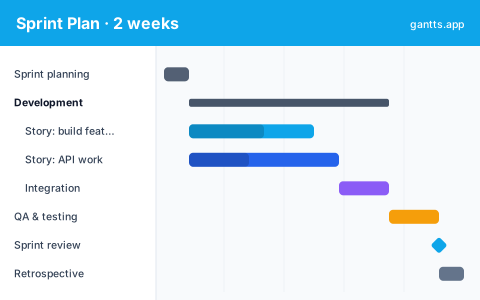
The template lays out a single sprint from planning to retro, each part pre-filled so you can adapt rather than start from a blank page:
- Sprint planning, commit the backlog and size the stories on day one.
- Development, the stories themselves, plus supporting work like API and integration tasks.
- QA & testing, verification that runs alongside and after development.
- Sprint review, the demo of completed work. Milestone: sprint review.
- Retrospective, the team's look back before the next sprint begins.
Who uses this template
Scrum masters, agile team leads, and product owners use this to plan a single sprint on a timeline. It lays out ceremonies, user stories, and team capacity side by side, helping the team commit to a realistic scope and spot when a story's dependencies or a planned day off will squeeze the sprint goal.
A 2-week sprint day-by-day
The grid spans ten working days. Day one is sprint planning; the middle days are development and testing running in parallel; the final days converge on the review and retrospective. Laying the sprint out day-by-day makes over-commitment obvious before it happens, if the QA bars pile up in the last two days, you've planned too much. The working-day calendar skips weekends automatically, so a two-week sprint really means ten days, not fourteen.
Ceremonies & story tracking
Scrum ceremonies, planning, review and retrospective, are placed as fixed points so the cadence is visible at a glance, and you can add a recurring daily standup if you want it on the chart. Each story is a bar you assign to an owner, which turns the timeline into a lightweight capacity view: you can see who is loaded on which days and rebalance before the sprint starts rather than mid-flight.
How to customize free
- Set the sprint start date and let the two-week grid line up with your calendar in the free online editor.
- Drop in your committed stories and size each bar to its estimate.
- Assign owners so capacity per person is visible across the sprint.
- Link dependencies between stories, API work, integration and QA.
- Mark the review as a milestone and add standups if you want the full cadence on the chart.
Scrum tips
- Plan to capacity, not to hope. If the bars overflow the last two days, cut scope in planning, the chart shows it immediately.
- Front-load risk. Sequence the riskiest or most-blocking stories early so there's time to react.
- Keep QA in parallel. Testing that only starts at the end creates a crunch; overlap it with development on the timeline.
- Protect the review date. Treat the sprint review milestone as fixed and manage scope around it.
- Update daily. A quick % complete pass before standup keeps the timeline honest and the retro grounded in facts.
Download formats
Grab the Excel (.xlsx) version to plan in a spreadsheet, the PowerPoint version for review decks, or the CSV to import anywhere. For a live, dependency-aware sprint schedule, edit it online free, no signup, and export to PDF, PNG, Excel or PowerPoint for standups and the review.
Related
Step up from a single sprint to the release with the agile template, plan the engineering work behind the stories with the software development template, or manage a short non-scrum effort with the weekly template. Browse them all on the templates page.
Frequently asked questions
How long a sprint does this template cover?
It's built for a standard two-week sprint with a day-by-day grid, but you can shorten it to one week or extend it to three by changing the sprint start and end dates in the free gantts.app editor.
Does it include scrum ceremonies?
Yes. Sprint planning, the review and the retrospective are pre-placed as tasks and milestones, and you can add daily standups so the whole cadence is visible on the timeline.
Can I track stories against capacity?
Yes. Each story is a bar you can assign to an owner, so you can see who is loaded when and keep the sprint within the team's capacity in the free gantts.app editor.
Is the sprint planning Gantt chart template free?
Yes. It is free to download and free to edit online with no sign up, and exporting to PDF, PNG, Excel and PowerPoint is free too.