
What's included
The template is organized quarter by quarter, each pre-filled with themes, features and release milestones so you can adapt rather than start from a blank page:
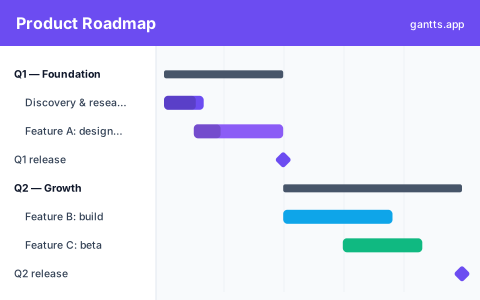
- Q1, Foundation, discovery and research, plus Feature A build. Milestone: Q1 release.
- Q2, Growth, Feature B build and Feature C beta. Milestone: Q2 release.
- Q3, Scale, platform work and integrations that widen the product's reach.
Who uses this template
Product managers, engineering leads, and startup founders use this to turn strategy into a release timeline. It plans features and releases across quarters, helping teams communicate priorities and dependencies to stakeholders and keep delivery aligned with the bigger product vision rather than a flat backlog.
Roadmap vs Gantt chart
A roadmap communicates direction, the themes and outcomes you're pursuing over time. A Gantt chart shows the execution underneath: task durations, sequencing and dependencies. They're often treated as rivals, but they answer different questions, and the best planning tools show both. This template gives you a roadmap timeline you can present to stakeholders, backed by Gantt-level detail your team can actually work from, so the story on the slide matches the plan in the tool.
Quarters, releases & milestones
Each quarter is a container for a theme, and each feature is a bar that spans the weeks it takes to build. Release milestones, the diamonds at the end of Q1 and Q2, are the fixed points stakeholders care about. Because everything lives on one timeline, a delay in Q1 visibly pushes the Q2 release rather than hiding in a status doc. That's the advantage of running a quarterly roadmap as a Gantt chart: commitments and reality sit side by side.
How to customize free
- Set the first quarter's start date and let the quarters flow from there in the free online editor.
- Rename the themes, Foundation, Growth and Scale are placeholders for your real strategic bets.
- Add or split features under each quarter and size their bars to your estimates.
- Mark releases as milestones so target dates stand out on the roadmap timeline.
- Link dependencies so a slip in one feature reflows the quarters that depend on it.
Roadmap tips for PMs
- Roadmap by outcome, plan by task. Keep the presented roadmap theme-level; keep the working Gantt task-level. This template lets you toggle between them.
- Get less precise further out. Q1 can be dated tightly; Q3 should be looser bars, not false-precision commitments.
- Protect release milestones. Treat each release diamond as a fixed gate and manage scope around it rather than letting the date drift silently.
- Re-baseline every quarter. Roll the roadmap forward, archive what shipped, and re-date the remaining bars against reality.
- Show the critical path. When you present, highlight the chain that actually drives the next release so leadership funds the right work.
Download formats
Grab the Excel (.xlsx) version to plan in a spreadsheet, the PowerPoint version for board decks, or the CSV to import anywhere. For a live, dependency-aware roadmap timeline, edit it online free, no signup, and export to PDF, PNG, Excel or PowerPoint whenever the roadmap changes.
Related
Take a release from the roadmap into detail with the product launch template, plan the engineering behind it with the software development template, or run delivery in iterations with the agile template. Browse them all on the templates page.
Frequently asked questions
What's the difference between a roadmap and a Gantt chart?
A roadmap communicates direction and themes over time, while a Gantt chart shows the underlying tasks, durations and dependencies. This template gives you a roadmap timeline with Gantt-level detail so you can plan and present in one view.
How many quarters does the roadmap template cover?
It ships with three quarters, foundation, growth and scale, plus release milestones. You can add or remove quarters and extend the quarterly roadmap as far as you need in the free gantts.app editor.
Can I present the roadmap timeline to stakeholders?
Yes. Open the template in the free gantts.app editor and export a PDF, PNG or PowerPoint slide of the roadmap timeline for board and stakeholder reviews.
Is the product roadmap Gantt chart template free?
Yes. It is free to download and free to edit online with no sign up, and exporting to PDF, PNG, Excel and PowerPoint is free too.