
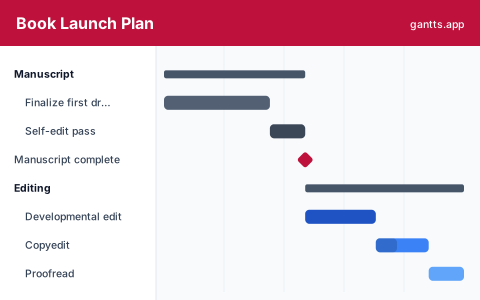
What's included
A book launch is really five projects stacked on one date: editing, production, pre-launch, marketing and the release. This template lays them on a single timeline so nothing collides, organized into six stages:
- Manuscript, Finish the draft and run a self-edit pass so the manuscript is ready to hand to an editor. Milestone: manuscript complete.
- Editing, Developmental edit for structure, then copyedit for line and consistency, then a final proofread. Milestone: manuscript final.
- Production, Cover design, interior formatting and typesetting, and ISBN and metadata so the files are ready for print and ebook. Milestone: files print-ready.
- Pre-launch, Recruit ARC and beta readers, send review copies and gather blurbs, and set up the pre-order. Milestone: pre-order live.
- Marketing, Build the author platform and email list, assemble a launch team, and book promotions and ads for launch week.
- Launch week & follow-up, Release the book, run launch-week promotions, chase reviews and ratings, then review what worked. Milestone: launch complete.
Who uses this template
Self-publishing authors, indie presses and hybrid publishers use this plan to coordinate a book launch across editing, cover and interior production, ARC reviews, pre-order and launch week. It fits fiction and non-fiction authors who need editing, marketing and the release date to line up rather than collide.
How to customize it
- Set the launch date and work backwards; editing and cover design almost always need more runway than first-time authors expect.
- Give ARC readers at least three to four weeks before release, reviews that land in launch week matter far more than late ones.
- Overlap production with the end of editing: cover design does not need the final proofread, so start it early.
- If you are traditionally published, replace the production phase with your publisher’s milestones and keep the marketing and launch stages.
- Mark "manuscript final", "files print-ready" and "pre-order live" as milestones so nothing downstream starts before its inputs exist.
Scheduling tips
- Editing is the usual critical path. Developmental → copyedit → proofread is a strict sequence, and slippage here pushes everything; protect it and start early.
- Cover design can run in parallel with editing. It depends on the concept, not the final text, so overlapping it buys weeks back on the schedule.
- Build the email list before you need it. A launch-week email to an engaged list outperforms almost any ad, but the list takes months to grow, start it in the marketing phase, not launch week.
- Send ARCs early and track them. Reviews need reading time; a review that posts on launch day is worth far more than one that arrives a month late.
- Schedule the follow-up. The two weeks after release, review chasing, ad adjustments, a post-launch review, are where many launches quietly lose momentum for lack of a plan.
Related templates
- Free Product Launch Gantt Chart Template
- Marketing Plan Gantt Chart Template
- Free Content Calendar Gantt Chart Template
- Browse all Gantt chart templates
Frequently asked questions
How far in advance should I plan a book launch?
Most self-publishers work back three to six months from the release date. The template spreads editing, production, pre-launch, marketing and launch week across a timeline so you can see whether your date leaves enough runway for editing and reviews.
When should I set up the pre-order?
As early as your retailer allows, often several weeks to months before release. The template makes the pre-order a milestone because ARC reviews and marketing momentum are timed against it, and retailers reward early sales.
Can I show dependencies between launch tasks?
Yes. Open the template in the free gantts.app editor to link finish-to-start relationships (developmental edit → copyedit → proofread → formatting) so downstream work shifts automatically and the critical path to your release stays visible.