
What's included
A pipeline is built by a production line walking down a corridor you do not own yet, inside seasons you do not control. The template keeps both constraints visible:
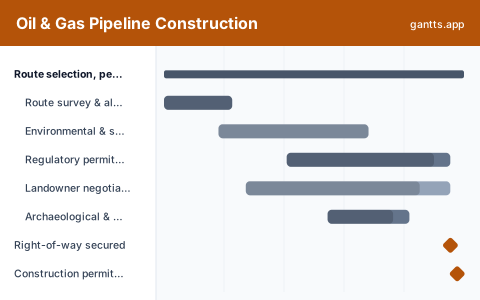
- Route selection, permits & right-of-way, Route survey and alternatives, the environmental and social impact assessment, regulatory hearings, landowner negotiation and easement acquisition, and heritage clearance. Milestones: right-of-way secured, construction permit issued.
- Pipe procurement & logistics, Line pipe mill order and production, mill coating and weld-end preparation, and the rail and truck haul to stockpile yards along the route. Milestone: pipe on the right-of-way.
- Pre-construction & environmental windows, Mapping the nesting seasons and in-stream windows onto the programme, access road and bridge upgrades, clearing and grading, topsoil stripping and erosion control, and spread mobilisation. Milestone: spread ready to string pipe.
- Mainline construction spread, The production line itself, stringing, trench, field bends and line-up, welding, radiographic and ultrasonic inspection, field joint coating and holiday detection, lower-in, padding, backfill and cathodic protection. Milestone: mainline welding complete.
- Crossings & special works, Horizontal directional drilling under the major river, watercourse crossings squeezed into the in-stream window, road, rail and foreign line crossings, block valve sites and the pump or compressor stations. Milestone: in-stream window closed.
- Hydrotest, tie-in & commissioning, Section isolation, test fill and pressurisation, the hold period and repairs, dewatering and drying, golden weld tie-ins, SCADA and leak detection, purge and product introduction, and reclamation. Milestones: hydrotest passed, pipeline in service.
Who uses this template
Pipeline construction managers, spread superintendents, and environmental and right-of-way coordinators use this for cross-country installs. It sequences right-of-way acquisition, seasonal environmental windows, the welding and x-ray spread, road and river crossings, hydrotesting, and final tie-in, aligning heavy crews and permits against weather-dependent constraints.
How to customize it
- Enter your own in-stream and nesting window dates first, as fixed bars, and then arrange the spread around them rather than the other way round.
- Split the mainline into one set of bars per spread if you are running multiple crews, and give each spread its own production rate in metres or joints per day.
- Model welding, x-ray and coating as overlapping bars that trail each other down the route, they are one moving production line, not three sequential phases, and drawing them sequentially hides where the real constraint is.
- Add a weld repair and re-shoot bar. A first-time-pass x-ray assumption is the most common optimistic error on pipeline programmes.
- Give right-of-way acquisition a long tail and a holdout contingency. One landowner who will not sign can stall a spread that is otherwise ready to move.
- Break the hydrotest into sections that match your test manifolds, and add a repair-and-retest bar after the hold period; a failed section needs to be found, cut out, rewelded and retested.
Scheduling tips
- Start easement acquisition before the design is finished. Land is the longest-lead item on most pipelines and it is entirely outside the contractor's control, treat it as procurement, with an owner and a weekly status.
- Do not let the spread outrun the pipe. Stockpile yard inventory ahead of the crew is the single best early-warning indicator on the job; if it is falling, the spread will stop before anyone reports a problem.
- Book the HDD crew and equipment against the window, not against the spread. Directional drilling contractors are specialised and scarce, and a rig that arrives after the in-stream window closes is a year of float gone.
- Treat the tie-in golden welds as a separate, carefully sequenced activity. They happen after hydrotest and cannot themselves be pressure tested in the same way, so they carry disproportionate inspection and schedule weight.
- Run SCADA and leak detection integration alongside the stations, not after them. Control room integration is a software programme with its own testing cycle and it routinely surprises pipeline schedules at the very end.
- Plan reclamation and landowner sign-off as real work. The pipeline may be in service, but until the right-of-way is restored and signed off, the project is not closed and the retention is not released.
Related templates
- Refinery Turnaround Schedule Template
- Road Construction Schedule Template
- Fiber Broadband Rollout Plan Template
- Browse all Gantt chart templates
Frequently asked questions
How long does it take to build a pipeline?
A medium-diameter cross-country pipeline commonly runs 20-28 months from route survey to in-service, which is roughly the span the template uses. Permits and right-of-way dominate the front; environmental windows dominate the middle.
What are environmental windows and why do they matter so much?
They are legally fixed periods when work near watercourses or in nesting habitat is permitted or prohibited. They cannot be negotiated or compressed, so missing one usually pushes that scope by a full year rather than by a few weeks.
How do I schedule a construction spread?
As a moving production line rather than as phases. Stringing, trench, welding, x-ray, coating, lower-in and backfill each proceed down the route at a rate, trailing one another, and the schedule should show them overlapping.
When should hydrotest be scheduled?
After backfill on each test section and before tie-in. Build in a hold period, a leak assessment, and an explicit repair-and-retest bar; assuming every section passes first time is the classic end-of-project overrun on pipelines.
Why is right-of-way acquisition on the critical path?
Because construction physically cannot begin on land you have no easement over, and negotiation timelines depend on individual landowners, not on your programme. It behaves like a long-lead procurement item and should be tracked as one.