
What's included
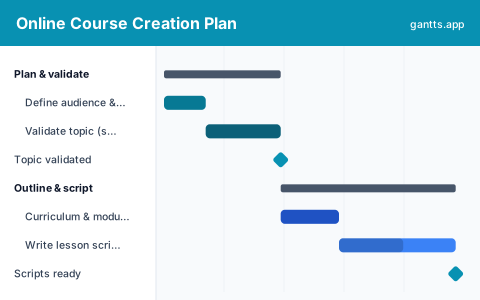
Most courses stall between "recorded" and "sold" because production and launch were never scheduled together. This template lays the whole build on one timeline, in the six stages a course actually moves through:
- Plan & validate, Define who the course is for and the outcome it delivers, then validate demand with a survey, waitlist or pre-sell before you record a thing. Milestone: topic validated.
- Outline & script, Turn the outcome into a curriculum, break it into modules and lessons, then write the scripts or slides so recording is fast. Milestone: scripts ready.
- Record & produce, Set up audio and lighting, record the video lessons and any screencasts or demos in focused batches. Milestone: filming wrapped.
- Edit & assemble, Edit the video and audio, build the workbooks and quizzes, and add captions and thumbnails so the course is complete. Milestone: course assembled.
- Platform & sales page, Choose a hosting platform, upload the lessons, set pricing and checkout, and build the sales page. Milestone: store live.
- Launch & promote, Warm up the email list, run pre-launch content or a webinar, open the cart, then follow up and gather reviews. Milestone: launch complete.
Who uses this template
Course creators, subject-matter experts, coaches and educators use this plan to take an online course from idea to launch without stalling between recording and selling. It suits solo creators and small teams building a cohort or self-paced course, keeping validation, production, platform setup and the launch on one timeline.
How to customize it
- Set your launch date first and work backwards, recording expands to fill whatever time it is given.
- Add a row per module under Record and Edit so a long course shows each unit’s own progress.
- If you are pre-selling, move the sales page and checkout earlier so you can take orders before filming finishes.
- Batch recording by setup (all talking-head lessons, then all screencasts) rather than in course order, it is far faster.
- Mark validation, "course assembled" and "store live" as milestones so nothing downstream starts before its inputs are ready.
Scheduling tips
- Keep validation on the critical path. Everything after it, scripts, recording, editing, is wasted if the topic is not wanted, so make the first milestone a real go/no-go.
- Script before you record. An hour of scripting saves several hours of re-shoots and editing; the schedule should never let recording start before scripts are done.
- Edit and workbook-building can run in parallel. They have different owners and no dependency on each other, so overlap them to compress the middle of the plan.
- Build the sales page while editing. The page does not need the final videos, only the promise and outline, so it can be live before the course is fully assembled.
- Treat launch week as its own sequence. Warm-up, open cart, close cart and follow-up each have timing that matters; schedule them rather than improvising.
Related templates
- Free Product Launch Gantt Chart Template
- Free Content Calendar Gantt Chart Template
- New Product Development Plan Template
- Browse all Gantt chart templates
Frequently asked questions
How long does it take to create an online course?
A focused solo course typically takes 8-12 weeks from validated idea to launch. The template spreads validation, scripting, recording, editing, platform setup and launch across a timeline so you can see whether your target date is realistic.
Should I build the course before or after selling it?
Validate, and ideally pre-sell, before you record. The template puts a validation milestone ahead of production so you commit filming time only once there is real demand; you can pull the sales page earlier to take pre-orders.
Can I show dependencies between course tasks?
Yes. Open the template in the free gantts.app editor to link finish-to-start relationships (validate → script → record → edit → launch) so later work shifts automatically and the critical path to your launch stays visible.