
What's included
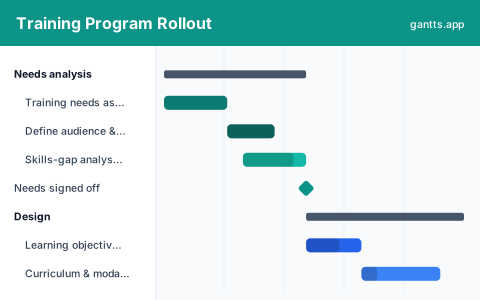
A training rollout stalls when content is built before the need is confirmed, or launched before it is piloted. This template puts the whole program on one timeline, in the six stages learning and development actually moves through:
- Needs analysis, Assess the training need, define the audience and objectives, and analyse the skills gap so the program solves a real problem. Milestone: needs signed off.
- Design, Set measurable learning objectives, design the curriculum and delivery modalities, and decide how you will assess success. Milestone: design approved.
- Development, Build the content and materials, set up and load the LMS, and prepare facilitator guides and train-the-trainer. Milestone: content ready.
- Pilot, Run a pilot cohort, gather feedback and evaluate, and revise the materials before scaling. Milestone: pilot signed off.
- Rollout, Schedule the cohorts and communications, enrol learners, and deliver the training in waves. Milestone: rollout complete.
- Evaluate & sustain, Measure results against the plan, reinforce with job aids and follow-up, and review the program to iterate. Milestone: 90-day review.
Who uses this template
Learning and development teams, HR business partners and enablement leads use this plan to roll out a training program across an organisation without content, LMS setup and cohort scheduling colliding. It suits corporate L&D, compliance and onboarding programs that move from needs analysis through a pilot to a phased, measured rollout.
How to customize it
- Set the go-live date and work backwards; content development and LMS setup almost always take longer than planned.
- Add a row per cohort or region under Rollout so each wave has its own schedule and owner.
- If the program is compliance-driven, add the deadline as a fixed milestone and check the rollout finishes before it.
- Keep LMS setup on its own track, it depends on the design, not the finished content, so it can run in parallel with development.
- Mark needs, design, content and pilot sign-off as milestones so no phase starts before its inputs are ready.
Scheduling tips
- Design before you develop. Building content against unclear objectives is the most common cause of rework; the schedule should never let development start before design is approved.
- The pilot is on the critical path to rollout. The full rollout depends on pilot sign-off, so protect the pilot window rather than compressing it to hit a date.
- Run LMS setup in parallel. It only needs the design and structure, so overlapping it with content development buys weeks back on the schedule.
- Schedule reinforcement, not just delivery. Learning decays without follow-up; job aids and refreshers belong on the plan, not in someone’s good intentions.
- Measure against the objectives you set. Tie evaluation back to the success metrics from the design phase, a rollout that delivered sessions but not outcomes has not finished.
Related templates
- Free Employee Onboarding Gantt Chart Template
- Change Management Plan Template
- Recruitment and Hiring Plan Template
- Browse all Gantt chart templates
Frequently asked questions
What is a training program rollout plan?
A training rollout plan is the timeline and phases for taking a learning program from needs analysis through design, development, a pilot, full rollout and evaluation. This template lays those stages on one schedule so L&D can see dependencies and the critical path to go-live.
What should a training rollout plan include?
At minimum: a needs assessment, learning objectives and design, content development and LMS setup, a pilot, the phased rollout, and an evaluation loop. The template gives each its own phase with milestones and owners.
Can I show dependencies between training phases?
Yes. Open the template in the free gantts.app editor to link finish-to-start relationships (needs → design → develop → pilot → rollout) so downstream work shifts automatically and the critical path stays visible.