
What's included
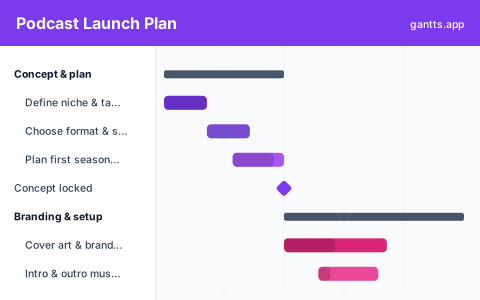
Most podcasts fade because they launch with one episode and no runway. This template plans the whole launch on one timeline, including the batch of episodes that keeps you consistent, in the six stages a show actually moves through:
- Concept & plan, Define your niche and audience, lock the format and show name, and plan a first season so you are not inventing each episode. Milestone: concept locked.
- Branding & setup, Commission cover art, sort the intro and outro music, and choose your hosting, equipment and recording space. Milestone: setup ready.
- Record launch episodes, Book and prep any guests, then record a batch of three to five episodes so you launch with a runway. Milestone: recording done.
- Edit & assets, Edit the audio, write show notes and transcripts, and record the trailer that introduces the show. Milestone: episodes ready.
- Submit & pre-launch, Set up your RSS feed and submit to Apple Podcasts and Spotify, build a simple website, and warm up an audience. Milestone: directories approved.
- Launch & grow, Drop the launch episodes together, run promotion and outreach, then review the analytics and settle into a cadence. Milestone: first month reviewed.
Who uses this template
Independent podcasters, creators and small production teams use this plan to launch a new show without it stalling after episode one. It suits hosts taking a podcast from concept and branding through batch-recording, editing and directory submission to a multi-episode launch, whether solo or with guests.
How to customize it
- Set your launch date and work backwards; cover art and directory approval both take longer than first-time hosts expect.
- Submit your feed to Apple and Spotify at least a week early, approval is not instant and you cannot launch without it.
- Add a row per launch episode under Record and Edit so a multi-episode drop shows each one’s progress.
- Keep branding on its own track, cover art and music depend on the concept, not the recordings, so they can run in parallel.
- Mark concept, setup, recording and directory approval as milestones so nothing downstream starts before its inputs are ready.
Scheduling tips
- Directory approval is on the critical path. You cannot launch until Apple and Spotify list your feed, and that can take days, submit early and treat it as a hard dependency before launch day.
- Batch-record before you launch. Recording three to five episodes up front is what separates shows that last from shows that podfade; the schedule should gate launch on that batch.
- Run branding in parallel with recording. Cover art, music and the website only need the concept, so overlapping them with production buys weeks back on the schedule.
- Record the trailer once episodes exist. A trailer that promises a tone the episodes do not deliver hurts; schedule it after the first edits, not before.
- Schedule the follow-up. The first month, promotion, guest outreach, checking analytics, is where a launch builds momentum or quietly stalls without a plan.
Related templates
- Online Course Creation Plan Template
- Book Launch Plan Template
- Free Content Calendar Gantt Chart Template
- Browse all Gantt chart templates
Frequently asked questions
How long does it take to launch a podcast?
A focused launch typically takes 8-12 weeks from concept to release day. The template spreads concept, branding, recording, editing, directory submission and launch across a timeline so you can see whether your date is realistic.
How many episodes should I launch with?
Most successful shows launch with three to five episodes at once, then keep a consistent cadence. The template builds that batch into the recording and edit phases and gates launch day on it.
Can I show dependencies between podcast launch tasks?
Yes. Open the template in the free gantts.app editor to link finish-to-start relationships (concept → record → edit → submit → launch) so downstream work shifts automatically and the critical path stays visible.